
My GoDaddy Poynt Card Reader isn't powering on
Your GoDaddy Poynt Card Reader comes with a charging station, or you can plug it in directly to an outlet. If your GoDaddy Poynt Card Reader won't power on or hold a charge, try these troubleshooting steps.
Step 1: Check the power cord connections
Verify that everything is connected securely and that there isn't any damage to the power cord.
- Connect the power cord to the wall socket and the GoDaddy Poynt Card Reader.
- Check that the LED light next to the power button is red (powered on, charging) or green (powered on, fully charged). This light may also flash blue intermittently, to indicate it's searching for Bluetooth signal.
- If everything is connected correctly and there's no power to the GoDaddy Poynt Card Reader, try plugging the device into a different outlet.
Step 2: Fully charge the GoDaddy Poynt Card Reader
Charge the GoDaddy Poynt Card Reader for 2-3 hours, to verify that it should be at full power.
- Once you've plugged the GoDaddy Poynt Card Reader into a power source, let it charge for 2-3 hours.
- Press the power button on the GoDaddy Poynt Card Reader to turn it on.
Step 3: Reset the GoDaddy Poynt Card Reader
Manually reset the GoDaddy Poynt Card Reader to try and override current lag or issues.
- Insert a paperclip into the small opening at the bottom of the GoDaddy Poynt Card Reader to activate the reset button.
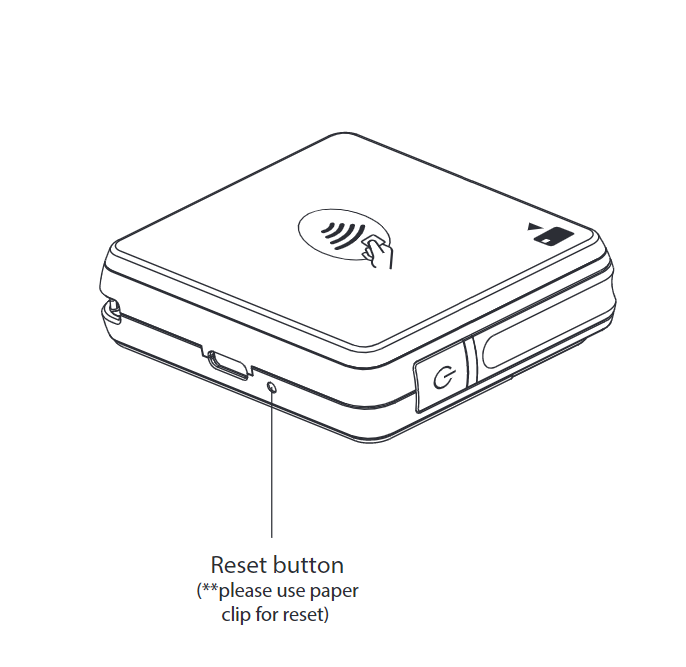
- Press the power button on the GoDaddy Poynt Card Reader to turn it on.
Step 4: Contact customer support
If the GoDaddy Poynt Card Reader still won't charge or turn on, contact us for additional assistance. Our GoDaddy Guides are here to help.
More info
What do the GoDaddy Poynt Card Reader lights and sounds mean?