
Load a roll of printer paper
Each GoDaddy Smart Terminal Duo is equipped with a built-in thermal printer. When you receive your GoDaddy Smart Terminal Duo, it comes with three rolls of thermal printer paper (2 ¼ x 16”). When you run out, you can order replacement paper rolls in your Commerce Hub.
- Open the latch on the printer compartment of your GoDaddy Smart Terminal Duo.
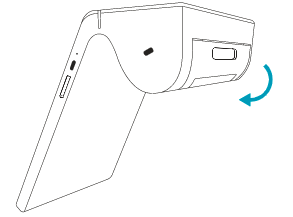
- Unwrap a printer roll and insert it in the compartment with the paper rolling down from the top and the end of the roll facing away from the compartment.
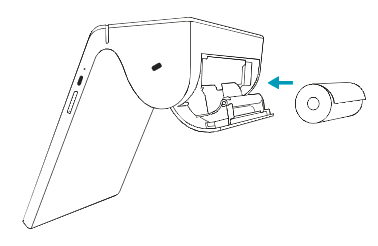
- Close the latch.
- Next, print a test receipt to make sure it’s working properly. Tap Settings on the second page of the Smart Terminal home screen.
- Tap Accessory.
- Under Printer, tap Test Printer.
- Tap Print Test.
- If the test receipt prints successfully, tap Yes. If the receipt didn’t print, tap No to manage your printer settings.