
Add restaurant reservation with OpenTable
Note: This feature is only available to Website Builder customers with a Standard, Premium or Commerce plan. OpenTable only supports English, French, Spanish, German, Dutch and Japanese.
If you run a restaurant, OpenTable's online reservation system makes it simple for your customers to find a time and table size that meets their needs.
- Go to your 123 Reg product page.
- Scroll down to Website Builder and select Manage next to the website you want to change.
- Select Website > Edit Site to open your site editor.
- Go to the page and location you want to add OpenTable, and add a section.
- Search for the Reservations section and add it.
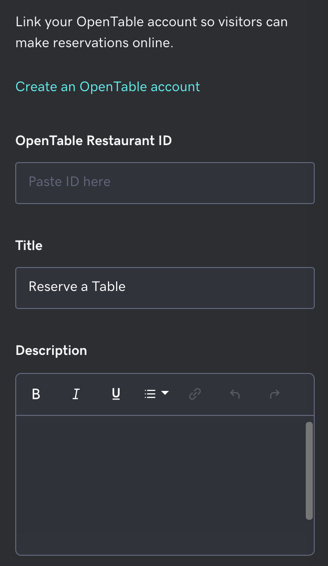
- In the right panel, begin personalizing the Title and Description with text of your own.
- If you already have one, enter your OpenTable Restaurant ID. Otherwise select Create an OpenTable account.
Note: It can take up to two business days for OpenTable to process your request for an account.
- Your changes are saved automatically. Use Preview to see the results and when you're ready to make the changes public, publish your site.